


SUGO:Voice Chat Party
3.2773.00 Reviews
App Specs
- Version
- 2.50.0.0
- Updated On
- License
- Free
- Downloads
- 50,000,000+
- Developer
- IndiaMasterApp
- Categories
- Social
- Platform
- Android
Screenshots
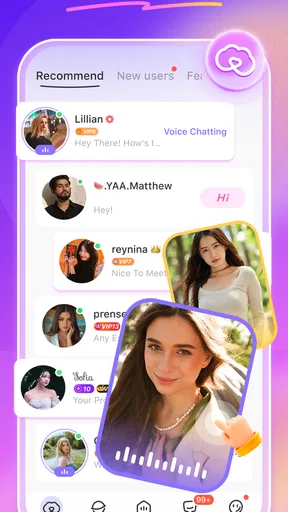
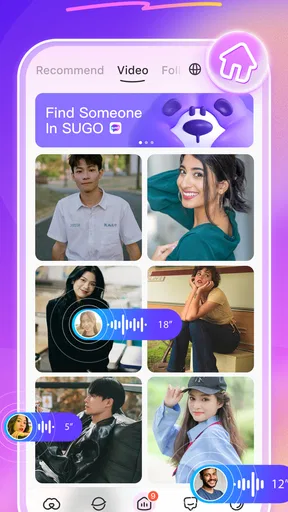
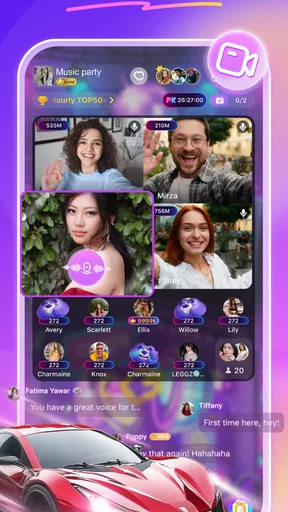
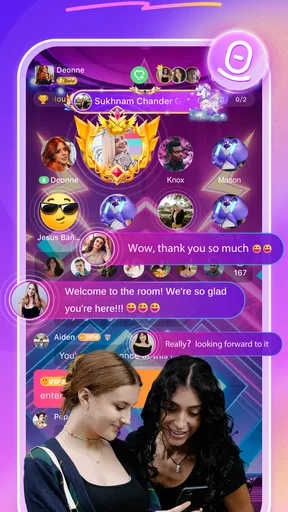

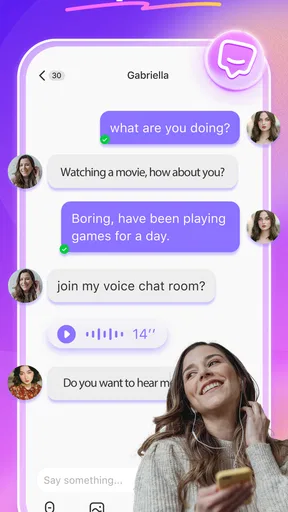
 Analysis by AppCompare
I spent time with SUGO: Voice Chat Party as a social app built around meeting people through live voice and video conversations. Its appeal is immediate: instead of writing long profiles or waiting for a reply, you can move toward a more direct interaction with people from different places. That makes it feel more spontaneous than a conventional social network, although it also means the quality of the experience depends heavily on who is available, how comfortable you are with live conversation, and how carefully you manage your privacy.
IndiaMasterApp is the developer behind the app, which sits in the social category and is available free of charge. It has passed over 50 million installs, so this is not a small experiment with an unknown audience. At the same time, its average rating is 3.2 from around 155 thousand ratings, a useful warning that popularity does not automatically mean a smooth experience for everyone. I would approach it as a casual social discovery tool rather than as a polished replacement for every messaging app on my phone.
How SUGO feels in everyday use
The first thing I noticed is that SUGO is designed for low-commitment interaction. A normal text-based social app lets me think about every message, edit my wording, and leave the conversation whenever I want. Voice and video remove that distance. The benefit is a faster sense of whether a conversation feels natural; the drawback is that awkward moments arrive just as quickly.
That difference matters when deciding whether this app suits you. If you enjoy meeting unfamiliar people, practicing casual conversation, or filling a short break with live interaction, the format can be engaging. If you mainly want to maintain conversations with close friends, ordinary messaging apps are usually more predictable and less demanding. SUGO is about discovery and immediacy, not simply keeping an existing contact list organized.
The worldwide angle gives the app a broader social feel than a local group chat. It can be interesting to hear different accents, compare routines, or find someone who shares a hobby that is uncommon among your usual contacts. Still, a large potential audience also creates uneven conversations. Some people may be looking for a quick chat, while others may expect a more sustained connection. I found that the best results come from treating each interaction as a brief introduction rather than assuming it will become a lasting friendship.
What speed means for a live conversation
In a voice or video service, speed is not just about opening the app quickly. The important moments are finding an available conversation, connecting without a long wait, and keeping the exchange understandable once it begins. SUGO’s format makes delays more noticeable than they would be in a text feed because even a short pause can feel uncomfortable when two people are waiting for one another.
I recommend using it when your connection is already dependable rather than launching it in a place with unstable mobile coverage. A live conversation has less room for recovery than a written message. If audio breaks up, the other person may interpret the silence as disinterest and leave before the connection settles. That is a practical reason to use headphones, stay somewhere quiet, and avoid switching repeatedly between networks during a call.
Worth Reading Before You Choose

Flipboard Shows What News Apps Must Do Beyond the Feed

Switching to Android Auto Means Rethinking Your Driving Routine

Google Calendar Makes a Crowded Week Easier to Manage

Ludo King Makes the Most of the Minutes Between Plans

Baby Panda World Brings Quick Play to Modern Phones, but Its Game Library Feels Busy

ESPN’s Live Game View Makes Following Close Games Easier
The app is also better suited to short sessions than to leaving it open all day. A quick visit during a break gives the experience a clear purpose: browse, start a conversation, and leave when your attention is needed elsewhere. Keeping any live social app active for long periods can make the phone feel busier, especially when the device is already handling other demanding tasks. I would not judge SUGO by the same standard as a lightweight text messenger because voice and video naturally require more from a phone and a connection.
When the app feels demanding
The heaviest moments are easy to predict: starting video, maintaining a live conversation, and using the app while other applications are active. Video requires more continuous work than text, and the phone must keep the screen, camera, microphone, network connection, and app session working together. On an older device, that combination may feel less comfortable than a simple chat, particularly if the battery is already low.
My practical advice is to begin with voice when you want a lighter, less exposed introduction. Voice removes the pressure of appearing on camera and can make it easier to decide whether the conversation is worth continuing. If the exchange feels comfortable, video becomes a more deliberate choice instead of the default first step. This is one of the most useful ways to control the app’s social and technical demands at the same time.
Another sensible workflow is to close unrelated apps before a longer session. I would not claim that every phone will show the same behavior, but reducing background activity is a reasonable precaution when using any live communication service. It can also make troubleshooting simpler: if a conversation goes poorly, you have fewer competing causes to consider.
Users should also remember that a conversation can consume attention even when the app itself seems simple. A live exchange is not something I can casually skim while walking, cooking, or crossing a street. For safety and concentration, I would use it while seated and in a private setting. That is particularly important for a mature social service where the tone of interactions may vary considerably.
Stability, interruptions, and recovering gracefully
Reliability in SUGO is best understood as a combination of app behavior, device condition, and network quality. A live call can be interrupted by a weak signal, a system notification, another call, or the phone’s power-saving behavior. When something goes wrong, the most useful response is not to keep tapping repeatedly. I would first check whether the microphone or camera is being used elsewhere, confirm the connection, and then reopen the conversation calmly if needed.
That recovery habit matters because live social apps can make a minor technical issue feel personal. If the other participant disappears, it may simply be a dropped connection or a change of interest rather than a problem with your phone. I found it healthier to treat every session as temporary and avoid sharing sensitive information just because a conversation feels friendly after a few minutes.
The app’s rating suggests a mixed experience across its broad user base, and I think that is worth taking seriously. A service can be useful for one person and frustrating for another depending on device age, network quality, expectations, and the kinds of conversations encountered. I would not install it expecting every interaction to be equally smooth. Its strength is the possibility of a good spontaneous exchange, not guaranteed consistency from one session to the next.
If a session becomes uncomfortable, ending it is the right choice. You do not owe a stranger a long explanation, and you should not feel pressured to move the conversation to another service, reveal your location, or share personal contact details. The app’s live format can create a false sense of familiarity, so I recommend keeping early conversations general until trust has developed over time.
Device limits and the Android baseline
SUGO supports devices running Android 6.0 or later, which gives it a wide compatibility range. That does not mean every compatible phone will deliver the same experience. A phone that technically meets the operating-system requirement may still have limited memory, an older camera, a weaker microphone, or a battery that struggles with sustained live communication.
On a modest device, I would keep expectations realistic. Voice is the sensible starting point if video feels slow, warm, or uncomfortable. I would also avoid using the app while charging under a pillow or in another poorly ventilated place; live video can make a phone work harder, and heat is not something to ignore. If the device becomes unusually hot, pauses, or loses responsiveness, ending the session is more sensible than forcing it to continue.
People who use older phones should also think about storage and general system health. Keeping the operating system reasonably maintained, removing unused applications, and restarting the phone occasionally can help with overall responsiveness, although none of these steps can compensate for weak network coverage. The current version is 2.50.0.0, so I would keep the app updated through the normal store process when an update is available, especially if a problem appears after extended use.
iPhone users should make the same practical assessment even though the stated minimum requirement is for Android. The core question is not only whether the app installs, but whether the phone can comfortably handle live audio or video while maintaining a stable connection. A newer device with a healthy battery is a better match for this style of app than an aging handset used mainly for occasional text messages.
A realistic use case: a short evening conversation
Imagine finishing work or school and having twenty minutes before dinner. You want human conversation but do not want to plan a group call with friends. SUGO can fit that gap: open it, look for a conversation, begin with voice, and decide naturally whether to continue. If the exchange is pleasant, you can move to video only when you are comfortable. If it feels forced, you can leave without having invested an entire evening.
That same scenario also shows the limits. You may encounter a conversation that is too brief, mismatched, or uncomfortable. You may need to try more than once before finding someone compatible. The app is therefore better for users who enjoy uncertainty and quick social decisions than for someone seeking a carefully moderated, predictable discussion with a known group.
For language practice, the live format can be more useful than typing because it exposes you to natural pacing and pronunciation. I would still keep the goal modest: use it for informal practice, not as a substitute for a structured course or a trusted tutor. The worldwide audience may broaden the range of voices you hear, but it does not guarantee that every conversation will be patient, educational, or appropriate.
Costs, age suitability, and personal boundaries
The app is free to download and use, but it includes in-app purchases ranging from $0.49 to $99.99 per item. That wide range makes it important to understand your spending before tapping any purchase option. I would use the free experience first, decide whether the conversations are genuinely valuable to me, and set purchase restrictions on the device if children or other family members can access the account.
SUGO carries a Mature 17+ age rating. I would take that seriously rather than treating it as a minor label. The live nature of the service means users may encounter adult themes, direct approaches, or behavior that is unsuitable for younger audiences. Parents should not rely on the app’s presence on a phone as proof that it is appropriate for a teenager, and younger users should choose a different social environment designed for their age group.
Privacy boundaries are just as important as age. I would avoid sharing a full name, home address, school, workplace details, financial information, or a precise daily routine with someone I have just met. Be careful with the camera background as well: a room can reveal more than intended through documents, photographs, uniforms, or location clues. These are simple precautions, but they matter more in a live video setting than in a text-only feed.
I would also be cautious about moving quickly to private contact channels. Someone who insists on secrecy, money, intimate images, or immediate off-platform communication is giving you a reason to stop. The best use of SUGO is social and voluntary; no conversation is worth ignoring your instincts.
How it compares with familiar alternatives
Compared with WhatsApp, Messenger, or iMessage, SUGO is less convenient for people I already know. Those services are built around established contacts, dependable message history, and conversations I can resume later. SUGO is more exploratory, with the appeal of meeting someone new without first exchanging phone numbers. The trade-off is less predictability and a greater need for personal judgment.
Compared with a traditional social feed, SUGO puts more emphasis on immediate interaction. A feed lets me browse quietly and respond when ready; live voice and video ask me to participate in the moment. That can feel more genuine when the match is good, but it can also be tiring when I am not in the mood to perform socially. If I want passive browsing, I would choose the feed. If I want a chance at direct conversation, SUGO has the clearer purpose.
Compared with a dedicated video meeting platform, it is oriented toward casual social discovery rather than scheduled calls with colleagues, classmates, or family. I would not use it for an important appointment or a planned group presentation. Its value is the informal, open-ended interaction, and that value disappears when I need guaranteed attendance, formal controls, or a known participant list.
Who should try it, and who should skip it
I think SUGO is most suitable for adults who enjoy spontaneous conversations, understand that not every interaction will be rewarding, and can protect their privacy without needing constant guidance. It may also appeal to someone who wants occasional voice contact instead of endless text exchanges, or who is curious about speaking with people from outside their normal social circle.
I would skip it if you dislike talking to strangers, need a highly predictable connection, have an older phone that already struggles with live media, or are looking for a private tool for close friends. I would also avoid it if you are under the mature age rating or if you prefer social apps with a clearly defined topic, community, or moderation style. The app’s broad audience is part of its appeal, but it is also why the experience can vary so much.
My strongest recommendation is to start slowly. Use voice before video, keep the first conversations short, avoid purchases until you understand the service, and leave immediately when someone ignores your boundaries. These choices do not remove every risk or technical problem, but they make the app easier to evaluate on your own terms.
My performance verdict
After weighing the live format, device demands, mixed user feedback, and safety considerations, I see SUGO as a niche social option rather than an essential communication app. It can deliver a more immediate connection than text-based alternatives, particularly when I want to meet someone new during a spare moment. Its worldwide reach adds variety, but it also brings uneven conversations and less control over what happens next.
The app works best when I treat it as a short, intentional experience: use a stable connection, begin with voice, switch to video only when comfortable, and keep the phone cool and free from unnecessary background tasks. Those habits address the main practical friction without pretending that every session will be fast or reliable.
IndiaMasterApp has made a widely installed social app with a clear focus on live human interaction, but the 3.2 average rating shows that its broad reach comes with a mixed reception. I would recommend trying the free version only if spontaneous conversations genuinely appeal to you. For private chats with friends, scheduled calls, or a carefully controlled community, another app will probably be a better fit. For an adult who understands the boundaries and wants occasional, unpredictable voice or video contact, SUGO: Voice Chat Party is worth a cautious trial rather than an unquestioning recommendation.
Pros
- Easy to join voice rooms and meet people with similar interests.
- Live voice chats feel more spontaneous than text-based messaging.
- Interactive games and activities help keep conversations engaging.
- Profiles and social features make it simple to build new connections.
- Frequent events can give regular users more ways to participate.
Cons
- Some rooms may contain loud
- disruptive
- or low-quality conversations.
- The social atmosphere may feel overwhelming for shy or new users.
- In-app gifts and premium features can encourage additional spending.
- User activity and room quality may vary significantly by region.
- Privacy concerns require care when sharing personal details with strangers.
FAQs for SUGO:Voice Chat Party
What is SUGO: Voice Chat Party, and how does it work?
SUGO: Voice Chat Party is a social communication app built around voice conversations, live rooms, private messaging, and meeting people with similar interests. After creating a profile, you can browse users or active chat rooms, join conversations, send messages, and interact through voice-based social features. The experience is designed to be spontaneous and community-focused rather than a traditional text-only messenger.
Is SUGO: Voice Chat Party free to download and use?
SUGO can generally be downloaded for free on supported Android and iOS devices, and many of its basic social features can be accessed without paying. However, the app may include optional in-app purchases, virtual gifts, premium benefits, or other paid items. Before spending money, check the current pricing, subscription terms, and payment settings shown in your app store and inside the application.
Is SUGO: Voice Chat Party safe for meeting and talking with strangers?
SUGO includes a social environment where you may communicate with people you do not know personally, so users should apply the same caution used on any public chat platform. Avoid sharing your address, passwords, financial information, or private documents. Use blocking and reporting tools when necessary, and remember that profile details or conversations may not always represent a person accurately.
Does SUGO require a microphone, camera, or personal information?
Because SUGO focuses on voice-based interaction, microphone access may be needed for joining or hosting voice conversations. Some features may also request notifications, photos, contacts, or other permissions depending on how you use the app and your device settings. You can review and change permissions through Android or iOS privacy controls, and you should only provide information you are comfortable sharing.
Can I control unwanted messages, users, or notifications in SUGO?
SUGO typically provides ways to manage your social experience, including muting notifications, leaving chat rooms, blocking users, and reporting inappropriate behavior. The exact options can vary according to the app version, region, and feature being used. If a conversation becomes uncomfortable or suspicious, stop responding, preserve relevant evidence, and report the account through the available in-app tools.


